
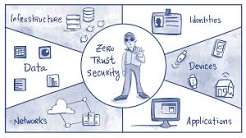
The expansion of businesses into the digital realm has increased the complexity of managing access to sensitive data. Employees work from different locations, applications operate in cloud environments, and third parties require access to company systems. These circumstances create numerous opportunities for unauthorised access, especially in organisations whose security policies rely on outdated assumptions that users inside the network can be trusted.
Conventional security measures primarily focus on protecting network boundaries. However, modern businesses can no longer draw a clear line between internal and external environments. Any employee account could be compromised, any personal device could expose sensitive data, and any application could contain security vulnerabilities.
This is where zero trust becomes important. Rather than automatically trusting users or devices because they connect to a familiar network, this approach requires organisations to verify access requests and evaluate risk continuously. Understanding the zero trust definition helps businesses recognise why stronger identity checks, restricted permissions, and ongoing monitoring are essential for protecting modern digital environments.
Understanding the Zero Trust Definition in Modern Security
To understand the zero trust definition, start with one central rule: never automatically trust a user, device, or connection. Every access request must meet established security requirements before an organisation grants permission to a resource.
Zero trust does not mean that businesses should distrust every employee personally. Instead, it removes the assumption that a connection is safe simply because it originates from an internal network or a recognised device. Security decisions depend on verified identity, device health, access permissions, the sensitivity of the requested resource, and other relevant risk signals.
For example, an employee might successfully sign in to a company account from an approved laptop. If the same account suddenly attempts to access confidential financial records from an unfamiliar device, the organisation can require additional verification or block the request.
This approach helps businesses make access decisions based on current evidence rather than outdated assumptions. It also supports more consistent security policies across offices, remote workplaces, cloud platforms, and on-premises systems.
Why Traditional Access Security Is No Longer Enough
For many years, organisations protected their systems by securing the network perimeter. Firewalls, virtual private networks, and other controls helped separate internal resources from external connections. Once users entered the protected environment, they often received broader access than their responsibilities required.
This model becomes less effective when employees use multiple devices, applications move to the cloud, and external partners need access to selected resources. Attackers who compromise an account or device may exploit excessive permissions to reach other systems.
These changes do not make perimeter security irrelevant. Firewalls and network controls remain valuable. However, organisations need additional safeguards that verify individual access requests instead of relying on network location alone. The UK National Cyber Security Centre explains these principles in its zero trust architecture design guidance.
Core Principles That Make Zero Trust Effective
Zero trust is not a single technology but a security approach built on several principles that work together to protect users, devices, applications, and data.
- Verify every access request: Authenticate users and assess the security status of their devices before granting access. Apply additional verification when risk signals or security policies require it.
- Enforce least-privilege access: Give users only the permissions necessary to perform their responsibilities. Review these permissions regularly and remove access that is no longer required.
- Use network segmentation: Divide networks and systems into controlled sections to restrict unnecessary communication between resources. If attackers compromise one system, segmentation helps prevent them from moving freely across other systems.
- Monitor activity continuously: Review access requests, detect suspicious behaviour, and reassess permissions when risk conditions change. Use monitoring results to investigate potential threats and improve security policies.
These principles should apply consistently across cloud services, internal applications, remote access, and third-party connections. Clear policies, appropriate technical controls, and regular reviews help organisations implement them effectively.
Zero Trust Compared With Traditional Security
The main difference between traditional perimeter-based security and zero trust is how each model treats trust. Traditional approaches often concentrate controls at the network boundary. Zero trust extends verification and access restrictions to individual requests and resources.
| Security area | Traditional perimeter model | Zero trust approach |
| Trust decisions | Often influenced by network location | Based on identity, context, and policy |
| Access permissions | May grant broad internal access | Limits access to required resources |
| Verification | Often strongest at initial entry | Reassesses requests when appropriate |
| Network design | Emphasises the protected boundary | Protects users, devices, applications, and data |
| Threat response | May struggle with internal movement | Uses segmentation and monitoring to limit spread |
Zero trust does not require businesses to discard every existing security control. Perimeter defences remain useful, but they become one layer in a broader security strategy. The goal is to reduce unnecessary trust and make access decisions more precise.
Practical Steps for Introducing Zero Trust
An effective implementation begins with understanding the organisation’s existing security environment. Introducing changes to every access rule at once can disrupt workflows and create confusion. A phased approach allows businesses to strengthen security while managing operational risks.
Organisations can begin with these practical steps:
- Identify critical assets: Determine which information, systems, applications, and networks require the strongest protection. Prioritise resources based on their sensitivity and business importance.
- Strengthen identity security: Implement multifactor authentication, disable unused accounts, and establish clear procedures for granting and revoking access.
- Review access permissions: Check whether users’ permissions align with their responsibilities. Remove excessive privileges and restrict access to sensitive resources.
- Monitor and improve security controls: Evaluate suspicious requests, investigate exceptions, and measure how effectively the organisation detects and responds to potential threats.
The UK Home Office’s engineering principles of zero trust also address request validation, privilege minimisation, data encryption, and monitoring. Organisations can use these recommendations to develop an implementation roadmap suited to their needs.
Strong governance, employee training, and realistic security testing can help teams apply these controls consistently while minimising disruption and unnecessary access barriers.
Conclusion
The zero trust definition reflects a shift from trust based on network location to access decisions based on verified identity, context, policy, and continuous assessment. This approach helps organisations reduce excessive permissions and limit the spread of threats.
Businesses do not need to transform their entire security environment immediately. They can start by identifying critical assets, strengthening identity verification, reducing unnecessary access, and monitoring relevant activity. With clear priorities and regular reviews, zero trust provides a practical foundation for stronger access security.
Frequently Asked Questions
1. What does zero trust mean in simple terms?
Zero trust means that users, devices, and connections are not trusted automatically. Every access request must meet the organisation’s security requirements before the requested resource becomes accessible.
2. Is zero trust the same as multifactor authentication?
No. Multifactor authentication is one control used to verify identity. Zero trust is a broader security approach that combines identity verification, access controls, device security, network segmentation, and continuous monitoring.
3. Does zero trust replace firewalls and VPNs?
No. Firewalls and VPNs remain useful security controls. Zero trust complements them by adding identity-based verification, least-privilege access, and more granular controls, making network location alone insufficient to establish trust.
4. Can small businesses adopt zero trust?
Yes. Small businesses can begin by enabling multifactor authentication, assigning minimum necessary permissions, promptly disabling accounts that are no longer needed, keeping devices updated, and reviewing access regularly. These measures provide a practical starting point for gradually adopting zero trust principles.
